Cart
Your shopping cart is empty! 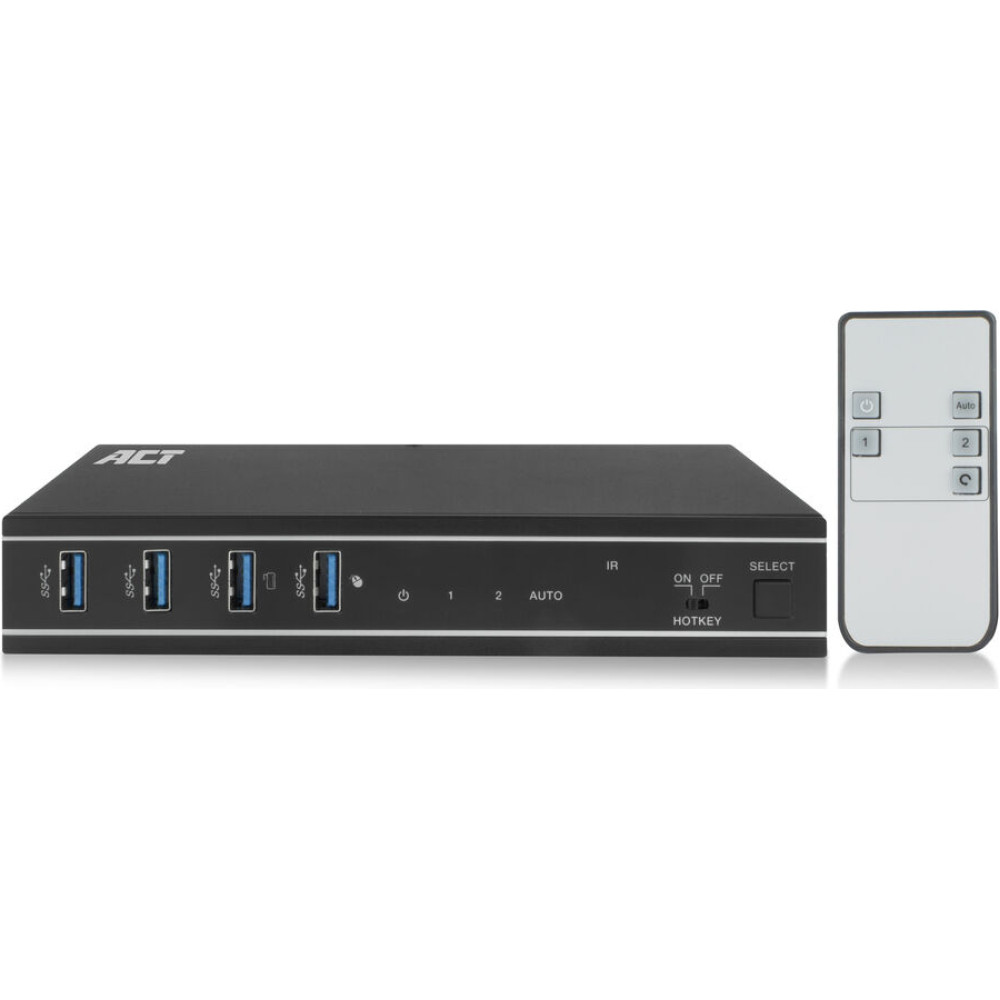

ACT KVM SWITCH 2X SINGLE HEAD HDMI
To purchase this product you must be registered in our system.
| The AC7912 2-port 4K HDMI KVM switch lets you simplify your workspace by controlling two computers while using a single monitor, a single USB keyboard and mouse. The HDMI output supports a monitor with a resolution up to 4K@60Hz. The AC7912 lets you switch between computers using the buttons on the switch itself, the IR remote control, keyboard hotkeys, a mouse, or RS-232 commands. Control two devices with a single monitor, mouse and keyboard Simplify your workspace by connecting two computers to the AC7912 via HDMI. Connect a single HDMI monitor and a single keyboard and mouse set to the switch and control both computers with minimal setup. Supports up to 4K@60Hz The AC7912 HDMI KVM switch supports 4K@60Hz, 4:4:4 12-bit, HDMI 2.0 and is HDCP 2.3 compliant. The EDID emulator in the KVM switch provides the correct display information from the monitor to the connected computer. Easy switching between computers Switching between two connected computers is easy with the dedicated button on the AC7912 KVM switch. Prefer to use IR control, a mouse, keyboard shortcuts or RS-232 commands? This is also supported. Auto input switching Have two computers connected to the KVM switch and only one is active? The AC7912 will automatically detect the active device. Additional features The AC7912 includes four USB 3.2 Gen1 (USB 3.0) 5Gbps ports for sharing peripherals, such as a keyboard, mouse, printer and more. The switch also has a 3.5mm audio jack for connecting headphones or speakers. HDMI cables, USB cables, remote control, RS-232 connector and mounting brackets are included. Prevent accidental power cord disconnection The power connection on the KVM switch is secured with a screw lock to prevent accidental disconnection. User scenarios Business use:
2-Port 4K@60Hz HDMI KVM Switch: Control two computers with a single monitor, USB keyboard and mouse 4 USB ports USB 3.2 Gen1 (USB 3.0) 5Gbps for peripheral sharing, 3.5mm audio out Supports up to 3840x2160@60Hz, 4:4:4 12-bit, HDMI 2.0 and HDCP 2.3 compliant Control the KVM switch with the front panel select button, IR remote control, keyboard hotkeys, mouse or RS-232 commands EDID emulator per input port provides correct information to connected PC or HDMI source Automatic input switching |